
You’ve just unboxed your Something Nice AquaClean Duo Water Flosser, excited to upgrade your oral care routine, only to find it won’t charge. You plug in a USB-C cable, but nothing happens. No light. No response. This frustrating scenario has left many users convinced their device is defective, when the real issue is far simpler than they expect.
The Something Nice AquaClean Duo uses a magnetic USB-C charging system with one critical requirement: it only works with USB-A to USB-C cables, not standard USB-C to USB-C cables. This guide covers everything you need to charge your flosser correctly, troubleshoot issues, and enjoy up to two months of battery life on a single charge.
Use the Right Charging Cable

The most important factor in charging your Something Nice water flosser is using the correct cable type. Despite having a USB-C-shaped port, this device requires a specific configuration to charge properly.
USB-A to USB-C Only Works
The only reliable way to charge the AquaClean Duo is with the included USB-A to USB-C magnetic cable. Standard USB-C to USB-C cables will not work, even though they physically fit the port.
This happens because the charging port uses a non-standard, charge-only USB-C configuration. Full-featured USB-C cables expect data negotiation and power delivery protocols that the flosser does not support. Without this handshake, no charging occurs.
What works includes using a USB-A wall charger connected to the original magnetic cable, or plugging into a laptop USB-A port with the original cable. What doesn’t work includes USB-C to USB-C cables, USB-C power banks, or charging directly from USB-C laptop ports without an adapter.
If you lost the original cable, purchase an official replacement from Something Nice. Third-party magnetic cables may lack the correct polarity or current rating needed for safe charging.
Follow Correct Charging Steps

Once you have the right cable, charging your flosser is straightforward. Follow these steps for reliable results.
Step-by-Step Setup
Power off the device before charging. A powered-on unit may not initiate charging properly.
Locate the magnetic charging port on the base or lower handle of the device. Ensure the port is dry and free of water or debris.
Attach the magnetic cable end to the port. The magnet will snap into place automatically. Do not force the connection.
Plug the USB-A end into a power source. Use a 5V/1A wall charger, a laptop USB-A port, or a power bank with USB-A output.
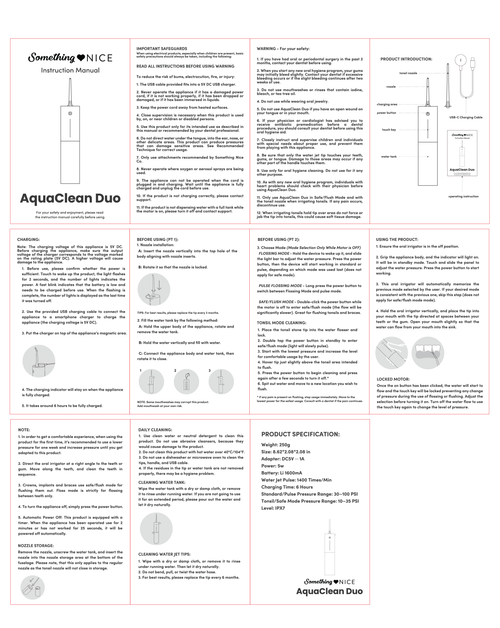
Check the LED indicator. A pulsing aqua-blue light means charging is in progress. A solid aqua-blue light means fully charged, which takes approximately two to three hours.
Disconnect the cable after full charge. Unplug from both the device and power source to prevent unnecessary wear on the battery.
Recognize Charging Indicator Lights
The aqua-blue LED indicator communicates your device’s charging status. Understanding these signals helps you know when charging is working and when it completes.
The pulsing aqua-blue light indicates charging is in progress. The solid aqua-blue light means the battery is fully charged. No light at all suggests no connection, the wrong cable type, or a power issue. A flickering or dim light points to a loose connection or weak power source.
If the light pulses for a few seconds then turns off, check for moisture in the port or try a different power source.
Troubleshoot Common Charging Issues
Even with the correct cable, issues can arise. Here’s how to diagnose and fix the most common problems.
No Light When Connected
If your cable is plugged in but no LED lights up, you likely have the wrong cable type. Switch to the original USB-A to USB-C magnetic cable and test with a different power source, such as a phone wall charger.
Charging Starts but Stops
If the LED pulses then stops before reaching full charge, several factors could be at play. Moisture in the charging port can interrupt the connection. A loose magnetic connection may cause intermittent charging. A low-power USB port from an older laptop might not deliver enough current.
Dry the port with a clean, dry cotton swab. Wipe the magnetic connector. Use a wall adapter instead of a computer port.
Device Heats Up During Charging
If your flosser feels warm or hot during charging, stop immediately. Overheating can damage lithium-ion batteries.
Unplug the device right away. Stop using third-party or damaged cables. Use only a 5V/1A power source and the original cable. Never charge in a bathroom right after a shower, as humidity increases the risk of short circuits.
Solid Light but Won’t Turn On
If your device shows a solid light but won’t power up, press and hold the power button for three or more seconds. Try resetting by charging for thirty minutes even if the light appears solid. Contact support if the device remains unresponsive, as this could indicate a hardware defect.
Prevent Charging Problems
Following best practices keeps your flosser charging reliably and extends battery life.
Always use the original or official replacement cable. Dry the device and port after every use. Charge in a dry, cool place away from the bathroom. Avoid overcharging by disconnecting after full charge. Store the device with twenty to eighty percent charge if not used for weeks.
Do not use non-magnetic or USB-C to USB-C cables. Do not charge near sinks, showers, or humid areas. Do not force the magnetic connector, as it aligns itself automatically.
Lithium-ion batteries last longest when not fully drained. Recharge when performance drops, even if the battery isn’t completely dead.
Buy a Replacement Charger If Needed
If you lost your original cable, a genuine replacement is available.
The official replacement costs ten dollars USD or six to nine euros EUR depending on your region. Available colors include purple, white, teal, and black. The package includes the magnetic USB-A to USB-C cable identical to the original. Free shipping is available in the US on orders over sixty dollars.
Purchase from the Something Nice official website or authorized retailers. Avoid third-party cables, as many lack correct magnetic polarity or current regulation, which risks damaging your device.
Understand Battery Life Expectancy
With normal use, your AquaClean Duo delivers impressive battery performance.
For twice-daily use with two-minute sessions, expect approximately six to eight weeks of battery life. For once-daily use with one-minute sessions, expect roughly eight to ten weeks. For occasional use, the battery can last up to two months.
Users report charging in January and using the device daily until it died in March, spanning over eight weeks. If your battery drains in days, check for faulty charging, excessive use of high-pressure mode, or an old degrading battery after more than one year of use.
Know Warranty and Support Options
Your AquaClean Duo includes coverage that protects your purchase.
The one-year warranty covers defective batteries, charging ports, manufacturing defects, and malfunctions under normal use. The warranty does not cover damage from wrong cables, water ingress during charging, or physical tampering.
Proof of purchase is required for all warranty claims. Support is available Monday through Friday.
A thirty-day return policy allows you to return a replacement charger for any reason with free return shipping in the US.
Contact Something Nice support if the correct cable and power source fail to resolve the issue, if the LED doesn’t light up, or if the device overheats or swells.
Maximize Travel Readiness
When traveling, assume hotel USB ports will not work with your flosser.
Bring the original USB-A to USB-C magnetic cable. Pack a compact 5V/1A USB-A wall charger. Consider a spare official cable in a different color for convenience.
For international travel, use a plug adapter, not a voltage converter. The charger works on one hundred to two hundred forty volts, so only the plug shape needs to change. Label your cable to avoid mix-ups, since USB-A to USB-C cables are uncommon.
Avoid Common User Mistakes
Learning from these errors saves time and frustration.
Using a USB-C to USB-C cable is the most common mistake. Just because it fits doesn’t mean it will work. Charging in a wet environment causes connection failures due to moisture. Assuming no wall adapter is included is not a defect; the device ships without one. Ignoring the LED light means missing important status information. Delaying support too long can void your warranty window.
Final Checklist: Charge Successfully Every Time
Use the USB-A to USB-C magnetic cable from the original package or an official replacement. Plug into a USB-A power source such as a wall charger, laptop, or power bank. Ensure the device is powered off and completely dry. Confirm a pulsing aqua-blue LED appears within thirty seconds. Allow two to three hours for full charge. Disconnect when the light turns solid blue. Store in a cool, dry place.
Frequently Asked Questions About Charging the Something Nice Water Flosser
Why won’t my Something Nice water flosser charge with my USB-C cable?
The AquaClean Duo requires a USB-A to USB-C magnetic cable, not a USB-C to USB-C cable. The charging port uses a non-standard configuration that doesn’t support full USB-C data and power negotiation protocols. Use only the original cable or an official replacement.
How long does it take to fully charge the AquaClean Duo?
A full charge takes approximately two to three hours using a 5V/1A wall adapter. Charging may take longer if using a lower-power source like an older laptop USB port.
How long does the battery last on a single charge?
Under normal use of one to two daily sessions, the battery lasts up to two months. Heavy use may reduce this to six to eight weeks.
What do the aqua-blue LED lights mean?
A pulsing aqua-blue light means charging is in progress. A solid aqua-blue light means the battery is fully charged. No light indicates no connection or a problem with the cable or power source.
Can I use a third-party charger cable?
Third-party cables are not recommended. Many lack the correct magnetic polarity or current rating, which can damage the device or cause charging failures. Purchase official replacement cables from Something Nice.
What should I do if my flosser overheats while charging?
Stop charging immediately and unplug the device. Allow it to cool down before attempting to charge again with the original cable and a 5V/1A power source. If overheating persists, contact customer support.
Key Takeaways for Charging Your Something Nice Water Flosser
The Something Nice AquaClean Duo delivers exceptional battery life and convenient magnetic charging, but only when you use the correct USB-A to USB-C cable. This single factor determines whether your device charges successfully or fails entirely. Keep a spare official cable on hand for travel or backup, and always store your flosser in a dry, cool place. Following the troubleshooting steps in this guide resolves most charging issues, and the one-year warranty protects against hardware defects. With the right charging setup, you’ll enjoy up to two months of cordless flossing on a single charge.