
You’re mid-flossing when your BURST water flosser suddenly stops. The green light is on, but nothing happens. No spray, no vibration, just silence. This exact scenario frustrates thousands of BURST SG835 owners who expected their $70 flosser to last years, not months. The device powers down mid-use, fails after charging, or dies completely after just six months of ownership.
This guide gives you a clear action plan. You’ll learn why your BURST water flosser keeps stopping, which fixes work in most cases, and when to contact BURST support for a replacement. We’ve analyzed real user reports and troubleshooting data to bring you solutions that actually work.
Hard Reset Your BURST Water Flosser
The most effective fix for a BURST water flosser that keeps stopping is a full hard reset. This clears software glitches and reactivates the battery management system after a deep discharge.
Step-by-Step Reset Procedure
- Unplug the charger from both the device and wall outlet completely.
- Press and hold the power button for the full 30 seconds.
- Release the button and wait 10 seconds. The lights may flicker or stay off.
- Connect the original magnetic USB cable to a working wall adapter (5V/1A).
- Charge uninterrupted for 8 to 12 hours, even if the green light appears earlier.
- Do not test or use the device during the charging period.
The hard reset works because lithium-ion batteries can enter lockout mode after deep discharge. Forcing the control board to reinitialize allows the battery to accept a full charge again.
Check the Charging Setup
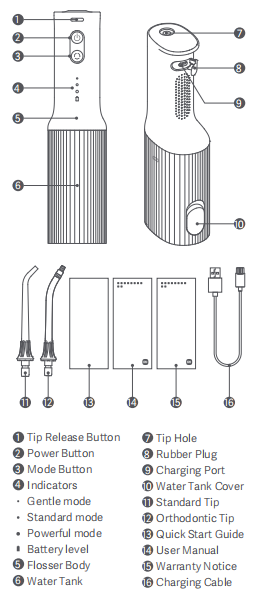
A faulty power source often mimics hardware failure. Many users fix their dead BURST water flosser just by changing one component in their charging setup.
Test Different Power Components
- Use a different wall outlet. Avoid power strips and extension cords entirely.
- Try a known-working USB adapter that provides 5V/1A minimum.
- Replace the cable if it appears frayed, bent, or damaged. Use only BURST’s magnetic cable or an MFi-certified equivalent.
- Inspect the charging port for debris. Clean gently with a dry cotton swab or compressed air.
Using non-standard chargers can deliver unstable voltage that damages the battery over time. If your outlet was the problem, the flosser should respond after switching to a proper wall connection.
Diagnose Green Light With No Power
Seeing a green light but experiencing no motor function means power reaches the indicator circuit, but not the motor itself. This is one of the most common failure points in the BURST SG835.
Check for Motor Issues
If the device hums faintly or vibrates slightly when you press the button, the motor may be seized due to lack of lubrication. Humidity and mineral buildup can corrode internal parts over time. Without opening the unit, you cannot repair this, but a hard reset may temporarily revive it.
Rule Out Internal Wiring Problems
A broken solder joint or loose wire can power the indicator light while leaving the motor non-functional. This often occurs after drops or long-term vibration exposure. Since the unit is sealed with ultrasonic welding, internal inspection requires destructive disassembly that voids your warranty.
Prevent Battery Failure
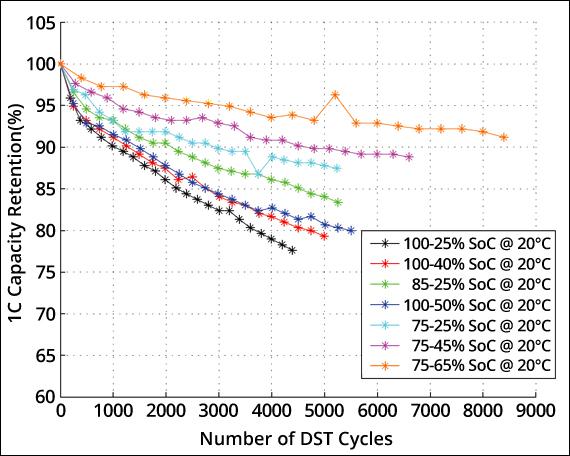
Battery degradation ranks as the number one cause of early BURST water flosser failure. Most units die within 6 to 18 months, well below the manufacturer’s promised 2 to 3 year lifespan.
Best Charging Practices
- Never let the battery drain completely. Recharge after every 1 to 2 uses.
- Deep discharges stress lithium-ion cells and can trigger permanent lockout.
- If the device shuts off during use, charge it immediately, even if you plan to finish your routine later.
- The green light does not guarantee a full charge. After a hard reset, charge for at least 12 hours straight to rebuild battery voltage.
Fix Charging Light Problems
Understanding what the indicator lights mean helps you diagnose faster. Light behavior can mislead, so knowing the patterns matters.
Light Patterns and What They Mean
Solid green light with no motor function: The battery shows charged status but cannot deliver current to the motor. Perform a hard reset followed by a 12-hour charge. If there is still no response, the battery or motor has failed.
Red light that stays on for hours without turning green: A faulty charging circuit, bad cable, or battery that cannot accept charge is the likely cause. Try a new cable and outlet. If the red light persists, the battery is likely dead.
No lights at all when plugged in: Check whether the charging port is clean and the cable magnetically attaches firmly. Test with a different USB power source. If nothing illuminates, the internal fuse or control board may be damaged.
Maintain Your Flosser Properly
Poor upkeep accelerates failure. Even regular use can cause buildup that strains the motor and shortens the device lifespan.
Weekly Maintenance Tasks
- Remove the nozzle and rinse it under warm water every week.
- Soak the nozzle in vinegar or use a soft brush to clear mineral deposits.
- Clogged nozzles increase motor load and lead to overheating.
- Use filtered or distilled water instead of tap water to prevent limescale inside the tubing and pump.
- Wipe the base and reservoir dry after each use and store the unit upright to prevent water pooling near electronics.
Avoid undiluted mouthwash. Alcohol can degrade seals and cause moisture infiltration that damages internal components.
Contact BURST Support for Replacement
If troubleshooting fails, contact BURST for a replacement, especially if your device is under one year old.
How to Reach Customer Service
Send an email to hello@burstoralcare.com. Include your model number (SG835), purchase date, proof of purchase, and a summary of the steps you’ve already tried, such as the hard reset and 12-hour charge.
Expect a response within 24 to 48 hours. BURST often ships replacements quickly, sometimes with a prepaid return label. They typically honor warranty replacements without question if the device is within the 1-year window.
Repair or Replace Your BURST Flosser
Most users simply replace the unit, but limited repairs are possible if you’re technically inclined.
Advanced Repair Options
The case is sealed with ultrasonic welding or strong adhesive. Opening it voids the warranty and may break internal clips. Use plastic prying tools and never metal.
Motor lubrication is one advanced option. Carefully separate the base from the body, locate the small DC motor near the pump, and apply a tiny drop of dielectric grease or silicone lubricant to the shaft. Reassemble and test. Over-lubrication can attract dust or cause short circuits, so this method does not guarantee success.
Battery replacement requires desoldering the old 3.7V lithium-ion cell and soldering in a compatible replacement. The risk of fire or further damage makes this unsuitable for non-experts.
Compare BURST to Waterpik Reliability
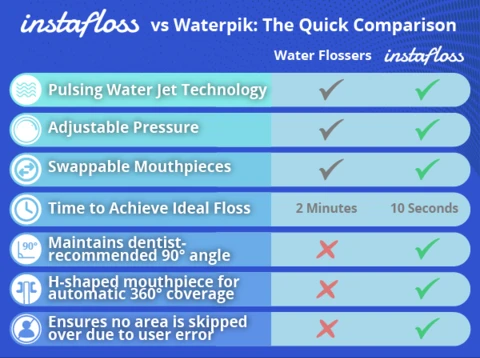
BURST isn’t alone in experiencing early failures, but some brands last longer than others.
Why Waterpik Outlasts BURST
Waterpik offers 10 pressure settings compared to BURST’s 3 to 5, more durable motors, and better sealing. Users report 3 or more years of reliable use from Waterpik models. The price is higher, but long-term value is better.
Other brands like Usmile, Equate, and CVS models show identical symptoms to BURST: green light with no power. This suggests a common flaw across budget flossers involving poor moisture protection, low-quality motors, and weak battery protection circuits.
BURST wins on design and quiet operation. Waterpik wins on reliability and longevity.
Maximize Your Flosser Lifespan
Extend your next flosser’s life with consistent habits that prevent the most common failure modes.
Smart Usage Habits
- Recharge after every 1 to 2 uses. Never wait for full shutdown.
- Use only the original charger and cable.
- Store the device away from sinks and showers on a dry counter.
- Remove water from the reservoir after each use.
- If you notice reduced runtime or weak motor sounds, act early. Reset and recharge before the battery dies completely.
When Your BURST Flosser Is Beyond Repair
After 12 months, replacement is often smarter than continued repair attempts.
Signs It’s Time for a New Flosser
- No lights appear, even with a new cable and outlet.
- Hard reset and 12-hour charge yield no response whatsoever.
- The motor makes grinding or buzzing noises.
- The unit smells like burning or overheats instantly.
At $60 to $80, a new unit costs less than repair services. If your BURST is older than a year and shows these symptoms, budget for a replacement rather than spending more on troubleshooting.
Frequently Asked Questions About BURST Water Flosser Issues
Why does my BURST water flosser keep stopping mid-use?
The most common causes are battery deep discharge lockout, motor seizure from lack of lubrication, or charging circuit failures. A hard reset followed by 12 hours of charging resolves the majority of cases.
How do I fix a BURST water flosser with a green light but no function?
Perform a hard reset by holding the power button for 30 seconds, then charge for 8 to 12 hours using the original cable and a wall outlet. If the motor still doesn’t respond, the battery or motor has failed and needs replacement.
Can I repair my BURST water flosser myself?
Limited repairs are possible, including motor lubrication after disassembly, but the sealed design makes this risky. Opening the device voids your warranty and may cause permanent damage. Most users should replace the unit instead.
Does BURST replace units under warranty?
Yes. BURST offers a 1-year limited warranty and typically replaces units that fail within this period. Contact hello@burstoralcare.com with your model number, purchase date, and proof of purchase.
How long should a BURST water flosser last?
Manufacturer estimates suggest 2 to 3 years, but user reports indicate most units fail between 6 months and 1.5 years. Battery degradation and motor issues are the primary failure causes.
Is Waterpik more reliable than BURST?
Yes. Waterpik water flossers generally last 3 or more years with reliable performance, while BURST units often fail within the first year. Waterpik offers better long-term value despite the higher initial price.
Key Takeaways for Preventing BURST Flosser Failures
Your BURST water flosser keeps stopping primarily due to battery lockout from deep discharge, motor seizure, or charging faults. In most cases, you can fix it fast with a 30-second hard reset followed by 12 hours of charging using the original cable and a wall outlet.
Prevention matters more than repair. Charge after every 1 to 2 uses rather than letting the battery drain completely. Use distilled water, clean nozzles weekly, and store the device upright in a dry location. These habits dramatically extend your flosser’s life.
If your device is under warranty and troubleshooting fails, contact BURST support for a replacement. They typically respond within 24 to 48 hours and ship replacements quickly.
For long-term reliability, consider switching to Waterpik. While BURST offers superior design and quiet operation, Waterpik outperforms in durability and can last 3 years or more with proper care. Choose based on whether you prioritize aesthetics or long-term value.