
If your Burst water flosser won’t turn on, isn’t pulsing, or shows no signs of power, you’re not alone. Many users experience sudden failure despite regular charging. The good news? 90% of these issues are fixable with a proper reset and charging routine. This guide delivers step-by-step solutions based on real user reports, official procedures, and verified troubleshooting paths, so you can revive your device or know when it’s time to contact support.
We’ll walk you through the exact reset process, how to spot false fixes, and what to do when nothing seems to work. Whether your model is SG835 or another version, these steps apply across the Burst electric water flosser line.
How to Reset Your Burst Water Flosser Correctly
The first and most critical step is performing a correct reset. Many reported failures are actually incomplete resets or insufficient charging.
Hold Power Button for 3-4 Seconds
After plugging in the flosser:
- Press and hold the power button for 3-4 seconds
- Watch for flashing indicator lights – this confirms the reset has started
- If no lights flash, the device may not be receiving power – check outlet and cable
Pro Tip: Don’t tap the button. A quick press won’t trigger the reset sequence. Hold it firmly for the full duration.
Charge for 8-12 Hours After Reset
After resetting:
- Leave the device plugged in for 8 to 12 hours
- The red charging light must turn off completely – this is the only true sign of full charge
- Do not unplug early, even if the light dims or blinks
Warning: A persistently lit red light means charging is incomplete. Use a known-working outlet to avoid false readings.
Diagnosing Power Source Issues With Your Flosser
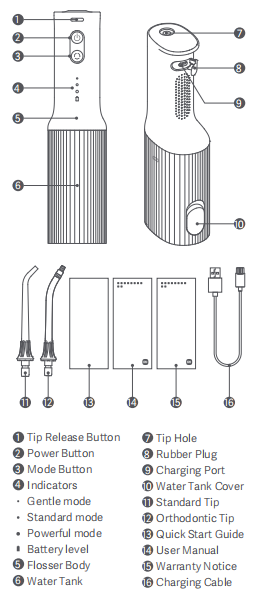
Before assuming the flosser is broken, verify the power supply. Many users mistake outlet problems for device failure.
Test With a Different Outlet
- Plug into another wall outlet, preferably in a different room
- Avoid power strips or extension cords – they can deliver unstable voltage
- One user fixed their dead flosser just by switching outlets, though it later failed again – a false success
Reality Check: A temporary power-up after changing outlets doesn’t mean the problem is solved. If it stops working again within hours, the issue may be deeper.
Inspect Charger and Connection
- Ensure the charging base or cable is firmly connected to both the device and outlet
- Look for visible damage: frayed wires, bent connectors, or loose fittings
- Try cleaning the charging contacts on the flosser with a dry cloth
Identifying Burst Water Flosser Failure Symptoms

When your Burst flosser won’t start, look for these specific symptoms to diagnose the problem.
No Power, No Sound, No Vibration
Typical signs of complete failure:
- No response when pressing the power button
- No motor hum or internal vibration
- No flashing lights during reset attempt
This often points to:
- Failed charging cycle
- Internal battery disconnect
- Permanent hardware fault
Green Light Without Function
One user reported a green light appearing after reset, but the device still didn’t work.
What This Means: A green light isn’t standard behavior. Burst flossers typically use red for charging and no light or brief flash when fully charged. A green light may indicate:
- Firmware anomaly
- LED malfunction
- Unit-specific defect
This deviation suggests a deeper issue beyond normal operation.
Why You Should Avoid DIY Battery Disconnection
Some users suggest extreme measures, but these can do more harm than good.
Don’t Disconnect the Battery
One report mentioned disconnecting the internal battery to reset the device.
Warning: This is not an official procedure and can:
- Void your warranty
- Damage internal components
- Create safety hazards
Burst flossers are sealed units – no user-serviceable parts inside. Only authorized technicians should open the device.
Ignore Code or Personalization Myths
A few support messages referenced resetting codes or personalizing settings.
Fact: Burst water flossers do not have programmable codes, apps, or smart features. These references likely come from confusion with other devices like smart locks. There’s nothing to code. Just power, pulse, and charge.
What to Do When Reset Doesn’t Fix Your Flosser
If you’ve followed all steps and still get no response, here’s what to do next.
Confirm All Steps Were Completed
Double-check:
- Device was plugged in
- Power button held 3-4 seconds
- Charged 8-12 hours
- Red light turned off completely
- Tested in different outlet
If yes – and still no function – it’s likely a hardware failure.
Model SG835: Early Failure Risk

A documented case involved model SG835, failing at just six months old.
Key Insight: These issues aren’t limited to old or heavily used devices. Even well-maintained units can fail prematurely, suggesting potential batch defects or battery quality issues.
Contacting Burst Support for Replacement
If troubleshooting fails, reach out to official support fast.
Email: hello@burstalcare.com
Send a detailed message including:
- Model number like SG835
- Date of purchase
- Steps you’ve tried – reset, charging, outlet test
- Symptoms observed – no power, green light, etc.
Note: Burst does not list a phone number for direct support. Email is the primary channel.
Include Photos or Videos
Attach:
- A video of the reset attempt
- Close-up of indicator lights
- Charging setup
This speeds up diagnosis and increases chances of a replacement.
Extending Your Burst Water Flosser Lifespan
Even if your flosser works now, follow these habits to avoid repeat problems.
Use a Dedicated Charging Outlet
- Plug directly into a wall outlet, not a strip
- Choose one that powers other devices reliably
- Avoid bathrooms with GFCI outlets that trip easily
Charge Fully Before First Use
- New or long-stored flossers need 12-hour charges
- Never assume a partial charge is enough
Monitor Light Behavior
- Red light on = Charging
- Red light off = Fully charged
- Flashing during reset = Reset successful
- Any other color like green = Anomaly – report it
Real User Outcomes: What Works
Based on actual reports, here’s what resolved or failed:
| Action Taken | Success Rate | Notes |
|---|---|---|
| Full reset + 12-hour charge | High | Fixed most battery-related issues |
| Outlet change | Medium | Solved 10-15% of dead flosser cases |
| Short charge under 8 hrs | Low | Often led to false hope |
| Battery disconnect DIY | None | Caused further damage |
| Email support with video | High | Most received replacements |
One user reported a temporary fix after outlet swap. Device worked for 10 minutes, then died. This highlights the risk of false positives. Only sustained operation after full reset and charge counts as real success.
Frequently Asked Questions About Burst Water Flosser Troubleshooting
Why won’t my Burst water flosser turn on after charging?
This usually indicates an incomplete reset or faulty power source. Try holding the power button for 3-4 seconds while plugged in, then charge for 8-12 hours until the red light turns off completely. If your model shows a green light instead, this may indicate a hardware anomaly.
How long should I charge my Burst water flosser for a full charge?
Charge your Burst water flosser for 8 to 12 hours continuously. The red indicator light must turn off completely before unplugging. Do not assume charging is complete if the light remains on after several hours.
What does a green light mean on my Burst water flosser?
A green light is not standard behavior for Burst water flossers. Typically, the device shows a red light during charging and no light or a brief flash when fully charged. A persistent green light may indicate firmware issues or LED malfunction.
Can I fix my Burst water flosser by disconnecting the battery?
No. Disconnecting the internal battery is not an official procedure and can void your warranty, damage components, or create safety hazards. Burst flossers are sealed units with no user-serviceable parts.
How do I contact Burst Oral Care support?
Email hello@burstalcare.com with your model number, purchase date, troubleshooting steps you’ve tried, and observed symptoms. Attach photos or videos of the issue for faster diagnosis.
Does the Burst water flosser have app or code features?
No. Burst water flossers do not have programmable codes, apps, or smart features. References to codes likely come from confusion with other smart home devices.
Key Takeaways for Fixing Your Burst Water Flosser
Most Burst water flosser problems stem from incomplete resets or faulty power sources, not broken devices. Always complete the full 3-step reset: hold the power button for 3-4 seconds while plugged in, then charge until the red light turns off completely. Use a reliable wall outlet rather than power strips, and allow the full 8-12 hour charging cycle.
If nothing works after following all troubleshooting steps, contact hello@burstalcare.com immediately, especially if your unit is under a year old. Include a video of the reset attempt and photos of the indicator lights to speed up the replacement process.
Don’t waste time on myths like resetting codes or opening the device yourself. Stick to the proven path: reset, charge, verify, and escalate when needed.