
You plug in your Nicwell water flosser, but nothing happens. No light. No charge. No sign of life. You try a different outlet, then a different USB-C cable. Still, it will not charge. Frustration builds. You are about to return it, convinced it is defective.
Here is the truth: your Nicwell water flosser likely works perfectly. It just needs the right cable. The issue is not your charger. It is not a broken battery or faulty port. The problem is that Nicwell’s USB-C port does not fully support USB-C to USB-C charging due to a design flaw. Despite having a USB-C-shaped port, the device only charges reliably with USB-A to USB-C cables, not the modern USB-C to USB-C ones most people now use.
In this guide, you will learn exactly why this happens, how to fix it in minutes, which cables work and which do not, and what to do if the problem persists. No guesswork. No unnecessary returns. Just fast, clear solutions so you can get back to healthy gums without the hassle.
Use USB-A to USB-C Cable Only
The single most effective fix for a Nicwell water flosser not charging is using the correct cable. Despite its USB-C port, this device only works with USB-A to USB-C cables, not USB-C to USB-C.
Why USB-C to USB-C Cables Fail
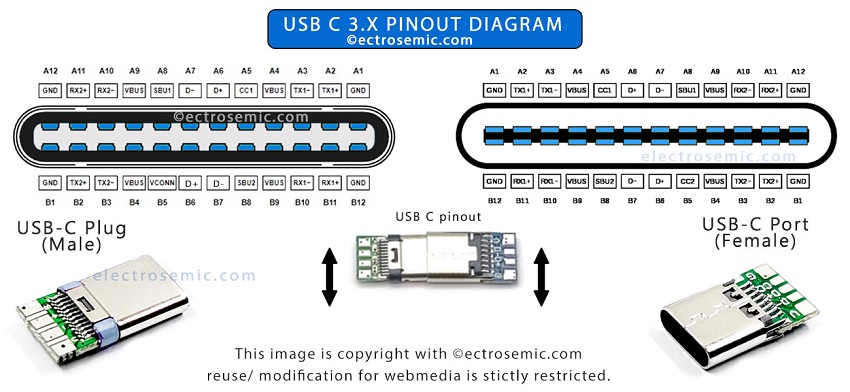
The Nicwell water flosser has a non-compliant USB-C port. While it looks like a standard USB-C connector, it lacks the internal 5.1kΩ pull-down resistors on the CC1 and CC2 pins required for proper device detection. Without these, USB-C chargers cannot recognize the flosser as a valid device and will not deliver power.
This means no LED light turns on. The battery remains at zero. The device appears dead even with high-quality USB-C to USB-C cables from Samsung, Apple, or Anker.
USB-A to USB-C Always Works
Even low-quality or thin USB-A to USB-C cables included with the device will charge it successfully. The reason is that USB-A ports do not require the same handshake protocol as USB-C, so the flosser bypasses the detection flaw.
These power sources work:
* Original Nicwell USB-A to USB-C cable
* Any third-party USB-A to USB-C cable
* Wall adapters, computers, power banks with USB-A ports
These sources do NOT work:
* USB-C to USB-C cables (any brand)
* Laptop USB-C ports
* GaN chargers with USB-C outputs
Pro tip: If you only own USB-C chargers, buy a USB-A wall adapter and pair it with any USB-A to USB-C cable. Total cost is under $10.
Fix: Replace Lost or Broken Cable
If your original cable is damaged or lost, replacing it is simple as long as you choose the right type.
What Cable to Buy
Look for a USB-A to USB-C cable regardless of brand or quality. You do not need fast charging, data transfer, or premium build. A basic charging cable is all that is required.
| Feature | Required | Notes |
|---|---|---|
| USB-A end | Yes | Must plug into standard rectangular USB port |
| USB-C end | Yes | Connects to flosser |
| Data transfer | No | Charging-only cables work fine |
| Power rating | Minimum 5V/1A | 5V/2.4A is safe and acceptable |
| Certification | No | Non-certified cables function normally |
Example: A $3 Anker or AmazonBasics USB-A to USB-C cable will work perfectly.
Official Replacement Option
Nicwell sells an official replacement called the Nicwell Black Foldable Flosser Charging Cable with SKU 770001. The price is $7.49 on Amazon or the Nicwell website. While available, you do not need the official cable. Any standard USB-A to USB-C cable performs the same.
Expert note: Any USB-A to USB-C cable should work. No special specs needed.
Diagnose Charging Problems Step-by-Step

If your Nicwell still will not charge with a USB-A to USB-C cable, follow this diagnostic checklist to rule out other issues.
Step 1: Confirm Cable Type
Make sure you are using USB-A to USB-C, not USB-C to USB-C. Check both ends. One end must be rectangular (USB-A). The other must be oval (USB-C).
Visual cue: USB-A looks like the old-school USB. USB-C is reversible and smaller.
Step 2: Test Power Source
Use a known-working USB-A power source. This includes phone wall chargers with USB-A ports, computer USB-A ports, and power banks with USB-A output. Avoid using USB-C-only sources like modern laptops or GaN chargers.
Step 3: Check LED Indicator
When properly connected, the LED light turns on near the button or base. A steady glow means charging. Light off or blinking means no connection or fully charged. If no light appears after one minute, proceed to the next step.
Step 4: Inspect Port and Cable
Look for bent pins inside the flosser’s USB-C port. Check for frayed wires or bent connectors on the cable. Look for debris or moisture in the charging port. Clean gently with a dry toothpick or compressed air if needed.
Step 5: Try Another A2C Cable
Test with a different USB-A to USB-C cable. If one works and another does not, the issue is the cable, not the flosser.
Common mistake: Assuming all USB-C cables are interchangeable. They are not, especially with non-compliant devices like the Nicwell.
Why This Happens: Design Flaw Explained
The root cause of the Nicwell water flosser not charging is incomplete USB-C implementation, a known cost-cutting measure in budget electronics.
Missing Resistors Disable C2C Charging
Standard USB-C devices use 5.1kΩ pull-down resistors on the CC1 and CC2 pins to signal their presence to the charger. The Nicwell flosser lacks these components, so USB-C chargers never detect it.
Think of it like knocking on a door with no one inside to answer. The charger sees no response and shuts off power.
Technical insight: Manufacturers do not read the spec and do not implement the two resistors necessary for correct identification.
USB-A Bypasses the Problem
USB-A ports do not require this handshake. They deliver power immediately, allowing the flosser to charge despite its flawed design. This makes the device functionally broken by modern standards yet still operable with older cable types.
Community verdict: Returning it as defective would still be an option, as that is what it is, honestly.
Prevent Future Charging Failures
Once you have fixed the issue, take steps to avoid it again, especially since the original cable is often thin and prone to damage.
Keep Your Original Cable Safe
The included USB-A to USB-C cable may be skinny and low-quality, but it works. Store it in a dedicated spot. Use a labeled pouch, travel case compartment, or outlet near your sink.
Pro tip: Wrap it loosely. Tight bends accelerate wear.
Buy a Backup Cable
Purchase a second USB-A to USB-C cable and keep it as a spare. Choose a sturdier version with braided insulation for longer life. Recommended brands include Anker PowerLine, AmazonBasics Braided, and UGREEN Nylon. All are under $10 and widely available.
Avoid USB-C-Only Setups
If you have gone all-in on USB-C chargers for phones, laptops, and docks, consider keeping one USB-A wall adapter solely for the flosser. Alternatively, use a USB-A port on a power strip or surge protector.
Warning: Do not rely on USB-C hubs or docks. They will not work.
Repair or Modify the Device (Advanced)
For tech-savvy users, it is possible to modify the flosser to accept USB-C to USB-C charging, but this requires soldering skills and voids the warranty.
Option 1: Add 5.1kΩ Resistors
Solder 5.1kΩ resistors between the CC1 pin and Ground and the CC2 pin and Ground. This mimics standard USB-C sink behavior and allows C2C charging.
Tools needed include a precision soldering iron, 5.1kΩ surface-mount or through-hole resistors, a multimeter to verify connections, and fine-tip tweezers. The difficulty level is intermediate to advanced.
Option 2: Replace USB-C Receptacle
Install a new USB-C board with proper resistor wiring. Some replacement boards come pre-wired for correct detection.
Risks include short circuits if pads are misconnected, permanent damage if overheated, and water resistance compromised. Only attempt this if you have experience with small electronics repair.
Warranty and Return Options
Despite working with the right cable, this limitation qualifies as a product defect, not user error.
Can You Return It?
Yes. Many users successfully returned their unit before discovering the cable fix. You have options.
These options are available:
* Return for refund or replacement, especially if the product listing did not mention the cable requirement. Retailers like Amazon often accept returns within 30 days.
* Contact Nicwell Support and ask for clarification on charging requirements. Request a free replacement cable if yours failed.
Do not accept “user error” blame. The device should support standard USB-C charging. Lack of warning in the manual or packaging is misleading.
What Nicwell Should Do
To prevent future issues, Nicwell should update product titles and descriptions to say “Use USB-A to USB-C Cable Only.” They should add warning labels on packaging, revise hardware to include proper USB-C compliance, and offer free replacement cables to affected customers.
Final Tips for Reliable Charging
Now that you know the fix, here is how to keep your Nicwell water flosser charging reliably long-term.
Do This
Always use a USB-A to USB-C cable. Keep original and backup cables. Use a dedicated USB-A wall charger. Store the device in a dry place because moisture harms the port. Clean the port monthly with a dry tool.
Avoid These Mistakes
Avoid using USB-C to USB-C cables because they will not work. Do not charge via laptop USB-C ports. Do not assume the device is dead without testing an A2C cable. Do not toss the original cheap cable.
Long-Term Outlook
While the Nicwell flosser performs well once charging is sorted, its non-standard USB implementation is a red flag. Competitors like Philips Sonicare, Waterpik, and Fairywill support full USB-C charging, making them more convenient and future-proof.
If you value simplicity and modern compatibility, consider upgrading when ready. But for now, your Nicwell works. Just give it the right cable.
Frequently Asked Questions About Nicwell Water Flosser Charging
Why will my Nicwell water flosser not charge with my phone’s USB-C cable?
Your Nicwell water flosser has a non-compliant USB-C port that lacks the necessary resistors for USB-C to USB-C charging detection. It only works with USB-A to USB-C cables. This is a design flaw, not a defect in your specific unit.
How do I know if my cable is USB-A to USB-C?
Check both ends of the cable. One end should be rectangular (USB-A), and the other should be oval and reversible (USB-C). If both ends are oval, it is a USB-C to USB-C cable that will not work.
Does the original cable that came with the Nicwell work?
Yes. The original cable included in the box is a USB-A to USB-C cable, and it works perfectly. Users often discard this “cheap” cable without realizing it is the only type that charges the device.
Can I use any brand of USB-A to USB-C cable?
Yes. Any USB-A to USB-C cable works, regardless of brand or quality. Even inexpensive third-party cables will charge your Nicwell reliably.
What if my Nicwell still will not charge even with a USB-A to USB-C cable?
If charging still fails with a known-good USB-A to USB-C cable, inspect the port for damage or debris. Try a different power source. If the problem persists, contact Nicwell support or consider a return if still within the warranty period.
Is this a defect that qualifies for a return?
Yes. Multiple experts classify this as a product defect. The device should support standard USB-C charging. You can return it or request a replacement, especially if the limitation was not clearly disclosed in the product listing.
Key Takeaways for Fixing Your Nicwell Water Flosser Charging Issue
The Nicwell water flosser not charging problem has a simple cause and an even simpler solution. The device uses a USB-C-shaped port that lacks proper internal components for USB-C to USB-C charging. It only works with USB-A to USB-C cables, which deliver power without requiring the handshake protocol that the flosser cannot perform.
The fix takes seconds. Swap your USB-C to USB-C cable for a USB-A to USB-C cable, and your device will charge immediately. The LED light will turn on, and your flosser will be ready for use. You do not need an official replacement cable. Any standard USB-A to USB-C cable from any brand works perfectly.
This design flaw affects many budget electronics, but it is not your fault. The product listing should warn users about this limitation. If you purchased the device recently, you can return it for a refund or demand a clearer explanation from Nicwell. Many users have successfully returned their units upon discovering this issue.
For long-term reliability, keep your original cable safe, buy a backup, and avoid USB-C-only charging setups. Your Nicwell water flosser works well once you give it the right cable. Do not throw away a functioning device over a cable mismatch.